


AMD Ryzen 5 7430U vs Ryzen 7 7730U: Performance, Power Consumption, Integrated Graphics, and Buying Guide

The Ryzen 5 7430U is the better-value choice for office work, browsing, streaming, and studying. Choose the Ryzen 7 7730U for frequent compilation, CPU rendering, and heavier multitasking: its eight cores and sixteen threads provide more processing capacity than the 7430U’s six cores and twelve threads.
Both use Zen 3 architecture, so the upgrade adds CPU and graphics resources rather than newer technology. Expect a bigger benefit in demanding workloads than in everyday use.
Ryzen 5 7430U vs Ryzen 7 7730U: Key Specifications
Both processors use the same Zen 3 platform. The main differences are CPU core count, boost clock, and integrated graphics.
| Specification | AMD Ryzen 5 7430U | AMD Ryzen 7 7730U |
|---|---|---|
| CPU architecture | Zen 3 | Zen 3 |
| Codename | Barcelo-R | Barcelo-R |
| Manufacturing process | TSMC 7nm | TSMC 7nm |
| CPU cores / threads | 6 / 12 | 8 / 16 |
| Base clock | 2.3 GHz | 2.0 GHz |
| Maximum boost clock | Up to 4.3 GHz | Up to 4.5 GHz |
| L1 cache | 384 KB | 512 KB |
| L2 cache | 3 MB | 4 MB |
| L3 cache | 16 MB | 16 MB |
| Default TDP | 15 W | 15 W |
| Integrated graphics | AMD Radeon Vega 7 | AMD Radeon Vega 8 |
| Graphics compute units | 7 | 8 |
| Maximum graphics frequency | 1,800 MHz | 2,000 MHz |
| Graphics memory | Shared system RAM | Shared system RAM |
| Supported memory | DDR4-3200 / LPDDR4X-4267 | DDR4-3200 / LPDDR4X-4267 |
| Memory channels supported | 2 | 2 |
| Maximum supported memory | 64 GB | 64 GB |
| PCI Express | PCIe 3.0 | PCIe 3.0 |
| Processor package | FP6 | FP6 |
| Maximum operating temperature | 95°C | 95°C |
| Launch date | Q4 2023 | Q1 2023 |
CPU Performance: How Much Faster Is the Ryzen 7 7730U?
The Ryzen 7 7730U scores 13.8–18.6% higher in the multicore tests below, compared with just 0.6–4.3% higher in single-core tests. Its main benefit is faster parallel processing, rather than a major improvement in everyday responsiveness.
| Benchmark | Ryzen 5 7430U | Ryzen 7 7730U | 7730U advantage |
|---|---|---|---|
| PassMark Single Thread | 2,890 | 2,907 | 0.6% |
| PassMark CPU Mark | 15,071 | 16,860 | 11.9% |
| Geekbench 6 single-core | 1,910 | 1,993 | 4.3% |
| Geekbench 6 multicore | 6,503 | 7,712 | 18.6% |
| Cinebench 2024 multicore | 421 | 479 | 13.8% |
Sources: PassMark aggregate results and TechRadar’s GEEKOM A5 comparison. Results come from separate datasets.
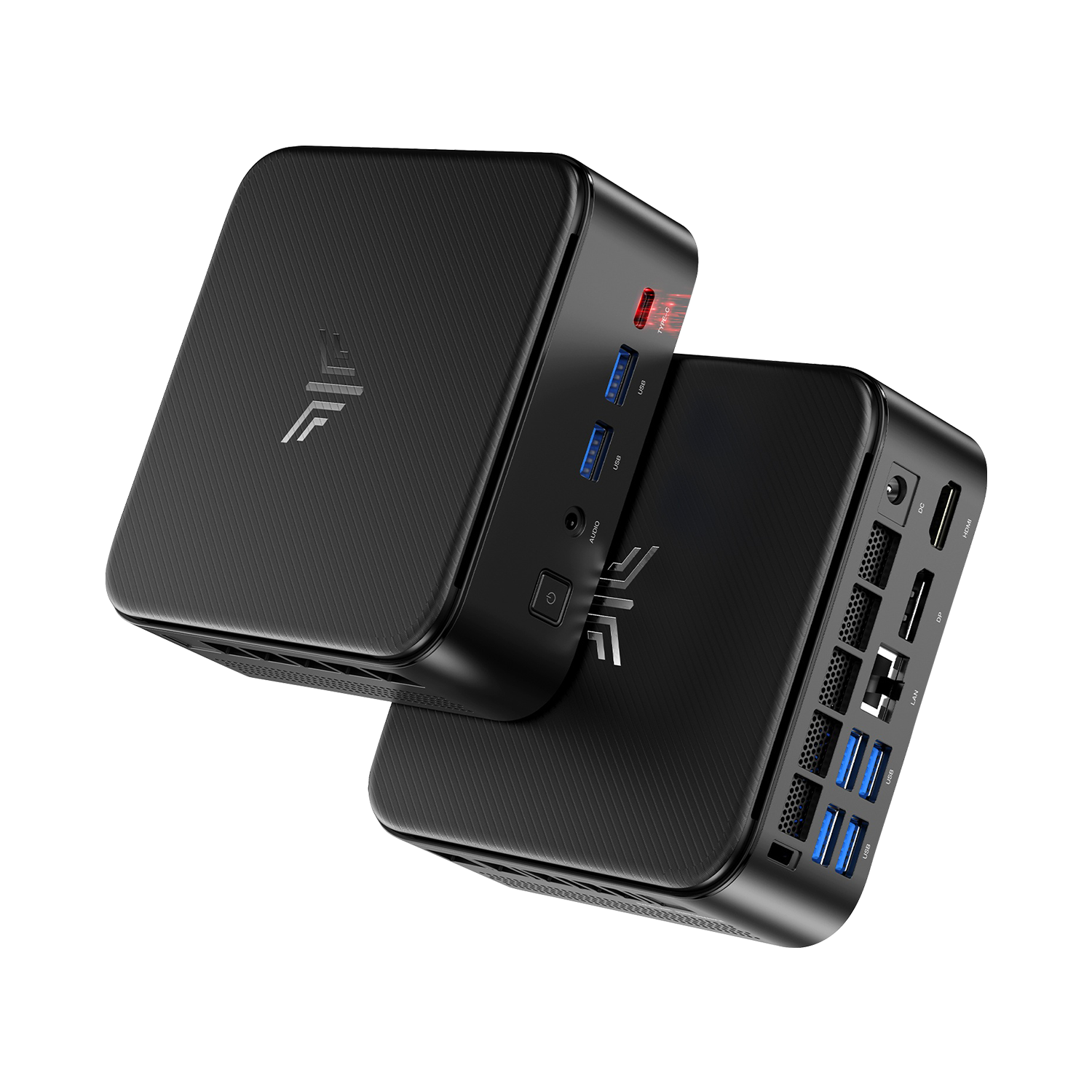
NiPoGi E3B Mini PC
- AMD Ryzen™ 5 7430U / Ryzen 7 7730U
- Up to 32GB DDR4 RAM + PCIe NVMe SSD
- Triple 4K Display Output
- Dual Air Vents Design | Wi-Fi 6 & Bluetooth 5.2
Everyday Work, Programming, and Content Creation
Office Work and Studying
The Ryzen 5 7430U is enough for documents, presentations, online classes, and video calls. Pair it with 16GB of RAM and an SSD for a practical office setup.
Choose the 7730U when your work regularly involves large spreadsheet calculations or data processing. Keeping many browser tabs open is a stronger reason to add RAM than to upgrade the CPU.
Programming and Virtual Machines
For web development, scripting, and smaller projects, the 7430U is a sensible choice. The 7730U is better suited to frequent parallel builds and CPU-intensive testing.
For multiple virtual machines, budget for memory alongside the processor. If your workload exceeds 16GB, a 7430U system with 32GB can be more useful than a 7730U system with insufficient RAM.
Photo and Video Editing
Choose the 7430U for occasional photo editing and simple video projects. The 7730U’s extra cores are more useful for frequent batch exports and CPU-based encoding.
For complex video effects or GPU rendering, prioritize a stronger graphics platform. Moving from the 7430U to the 7730U is a modest graphics upgrade, not a solution for demanding GPU workloads.
Integrated Graphics: Vega 7 vs Vega 8
The Ryzen 7 7730U has stronger integrated graphics: eight compute units at up to 2,000 MHz, compared with seven at up to 1,800 MHz in the Ryzen 5 7430U.
Both are suited to lightweight games and older titles at modest settings. The 7730U offers extra graphics headroom, but demanding modern games are a stronger reason to choose a more capable GPU.
For light gaming, choose the 7730U when it costs only slightly more than an otherwise comparable 7430U system. Prioritize dual-channel RAM with either processor, and avoid paying a large premium for the graphics upgrade alone.
Memory: Prioritize Dual-Channel RAM
Both processors use system RAM for integrated graphics. Dual-channel memory provides more bandwidth, making it especially useful for light gaming.
For a mini PC with replaceable DDR4 memory:
| Configuration | Best use |
|---|---|
| 2 × 8GB | Office work, everyday multitasking, and light gaming |
| 2 × 16GB | Larger development projects, multiple virtual machines, and heavier workloads |
| 1 × 16GB | Leaves room for expansion, but provides less bandwidth until a second module is installed |
Check the module arrangement, not just the total capacity: “16GB RAM” could mean one 16GB module or two 8GB modules.
For gaming, prioritize dual-channel memory before paying extra for the 7730U. For virtual machines and demanding multitasking, choose enough capacity to avoid running out of RAM.
Power Consumption: Does the 7730U Use More Electricity?
Both processors have a default TDP of 15W. This is a thermal design specification, not the electricity consumption of the complete computer.
The 7730U can finish parallel workloads faster, so higher power draw during a task does not necessarily mean more energy used overall. A direct comparison requires whole-system measurements; the benchmark results above do not establish which system uses less electricity.
For an Always-On Mini PC
Prioritize measured idle power if the computer spends most of its day waiting between tasks. For rendering or compilation, compare power consumption alongside completion time.
To put a measured difference in perspective, an extra 5W over eight hours a day adds up to 14.6kWh per year. Multiply that by your electricity rate to estimate the annual cost.
For a Laptop
Compare battery-life tests of the actual laptops. Battery capacity, screen power consumption, and manufacturer settings matter more than the shared 15W TDP suggests.
Cooling and Sustained Performance
For long renders and code builds, prioritize performance that the system can maintain. A short benchmark shows burst speed; repeated tests reveal whether performance drops as the computer heats up.
When comparing 7430U and 7730U mini PCs, look for:
- Sustained performance: results from extended rendering or repeated benchmark runs.
- Fan noise: how loud the system becomes during regular work and prolonged loads.
- Test settings: the power mode used, so results can be compared fairly.
For office work, favor quiet operation. For frequent CPU-heavy tasks, choose a well-cooled 7730U system that maintains its performance advantage under load.
Platform Features and Upgrade Options
Both processors support DDR4/LPDDR4X memory and PCIe 3.0. Moving to the 7730U adds processing power, but it does not bring DDR5 or PCIe 4.0 support.
A PCIe 3.0 NVMe SSD is sufficient for everyday office work. Prioritize storage capacity over advertised PCIe 4.0 speeds that these systems cannot fully use.
Before buying, check the computer’s:
- Display outputs: connections, supported resolutions, and refresh rates for your monitors.
- USB-C features: whether the port supports data, video output, or power input.
- Expansion options: accessible RAM slots and supported SSD upgrades.
These processors are soldered to the motherboard, so choose your CPU at purchase. RAM and storage expansion are the practical upgrade paths.
Ryzen 5 7430U vs Ryzen 7 7730U: Which Should You Buy?
| Main use | Recommended choice | Configuration priority |
|---|---|---|
| Documents, browsing, and video calls | Ryzen 5 7430U | 16GB RAM and an SSD |
| General coding and occasional editing | Ryzen 5 7430U | Enough memory and storage for your projects |
| Frequent code builds and CPU rendering | Ryzen 7 7730U | Effective cooling and sufficient RAM |
| Multiple virtual machines | Ryzen 7 7730U | 32GB RAM where supported |
| Light gaming | Ryzen 7 7730U if priced close to the 7430U | Dual-channel memory |
| Demanding gaming or GPU-heavy creative work | A stronger graphics platform | GPU performance |
Compare prices with equivalent RAM, storage, operating system, and warranty coverage. For everyday use, put the savings from a 7430U toward memory, storage, or a better monitor. For regular CPU-heavy work, the 7730U’s extra cores are the more useful investment.
Frequently Asked Questions
Is the Ryzen 7 7730U worth paying extra for?
Yes, for frequent compilation, CPU rendering, and other parallel workloads. For light office use, choose the 7430U when it provides a meaningful saving with otherwise comparable specifications.
Is the 7730U faster in games?
It has stronger integrated graphics and generally offers more gaming headroom. Choose dual-channel memory with either processor; game results also depend on resolution and graphics settings.
Can I upgrade from the 7430U to the 7730U later?
These processors are soldered to the motherboard and are not practical user upgrades. Choose the CPU at purchase, and check the computer’s supported RAM and SSD expansion options.
Do both mini PCs consume the same power because their CPUs have a 15W TDP?
No. TDP does not measure whole-system electricity use. Compare measured idle and load consumption for the actual mini PCs.